The last thing I did to my bug painting was to make it into a texture background. For this exercise, I used Photoshop CS5 once again.
First, I select all of the image, "Cmd-A" (Ctrl-A on PC) and copy, "Cmd-C" (Ctrl-C for PC users) and pasted it on a new layer. On this layer, I desaturated it with keyboard combo "Shift-Cmd-U" and then select all and copy again.
Here I need to create a new Alpha Channel. To do that, click on "/Filter/Render/Lighting Effects.../"
On the following screenshot, you will notice that there's a problem. Don't worry, the menu items I mentioned are correct. However, it doesn't show it on my version of Photoshop CS5.

I never really used Photoshop beyond just manipulating the colours and highlighting and optimizing the image size prior to this. So, I kinda got stuck. It is strange that my copy of PS CS5 was missing a menu feature. I asked and no one I asked had an answer. I searched online for remedy and found out that the problem lies with PS CS5 runs on a 64 bit and that it must to switched to 32 bit to have that menu feature. This to me is quite a surprise and I was very disappointed. At first, I thought that it was not available on my Mac when it runs 64 bit. However, I know that the PC's have been running 64 bit a while longer than the Mac. The problem does not seem to be with the Mac after I found a solution online. When I changed the setting on the Mac by going to the Application folder and right click the icon that launches PS, and checkmark "Open in 32-bit mode".
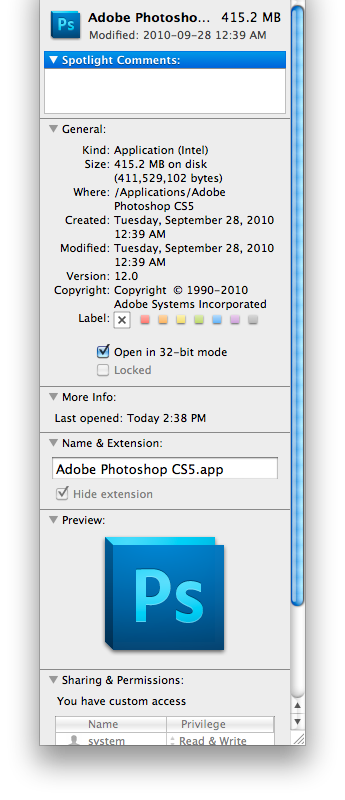
The menu feature of Light Effects...showed up after I've made the change to run 32-bit for PS. I guess no love from Adobe...thanks a lot!

Finally, back at the ranch, after clicking "Lighting Effects..." a window pops and here decide the settings according how you wish your texture will appear. Just ensure that "Preview" is checked to see the changes immediately in the preview.

When you are satisfied how your image is textured, click "Ok", save , and enjoy you work! Here's my version.


